
Somewhere over the Atlantic (on a plane heading to holiday) I had some spare battery so I was forced had to figure out something that had been bugging me for a while: when gaming on my Linux laptop, I never really knew whether Steam was using the NVIDIA GPU or the integrated Intel chip. No internet, but I did have a terminal. What follows is half an hour of trial and error at 10 kilometres altitude.
The problem
On a hybrid laptop (Intel iGPU + NVIDIA dGPU), Linux doesn’t always make the choice you’d expect. Some games run unnecessarily on the power-efficient Intel chip, while others drain the battery through the NVIDIA GPU when they don’t need to. Steam has a solution for this via launch options - but which combination of variables actually works isn’t immediately obvious.
The solution: PRIME Render Offload
NVIDIA provides a mechanism for this: PRIME Render Offload. By setting a few environment variables in Steam’s launch options, you can control which GPU each game uses.
Force the NVIDIA GPU
__NV_PRIME_RENDER_OFFLOAD=1 __GLX_VENDOR_LIBRARY_NAME=nvidia %command%
Use this for demanding games that need GPU power. __NV_PRIME_RENDER_OFFLOAD=1 enables the offload mechanism, and __GLX_VENDOR_LIBRARY_NAME=nvidia ensures OpenGL also runs through NVIDIA.
Force the Intel iGPU
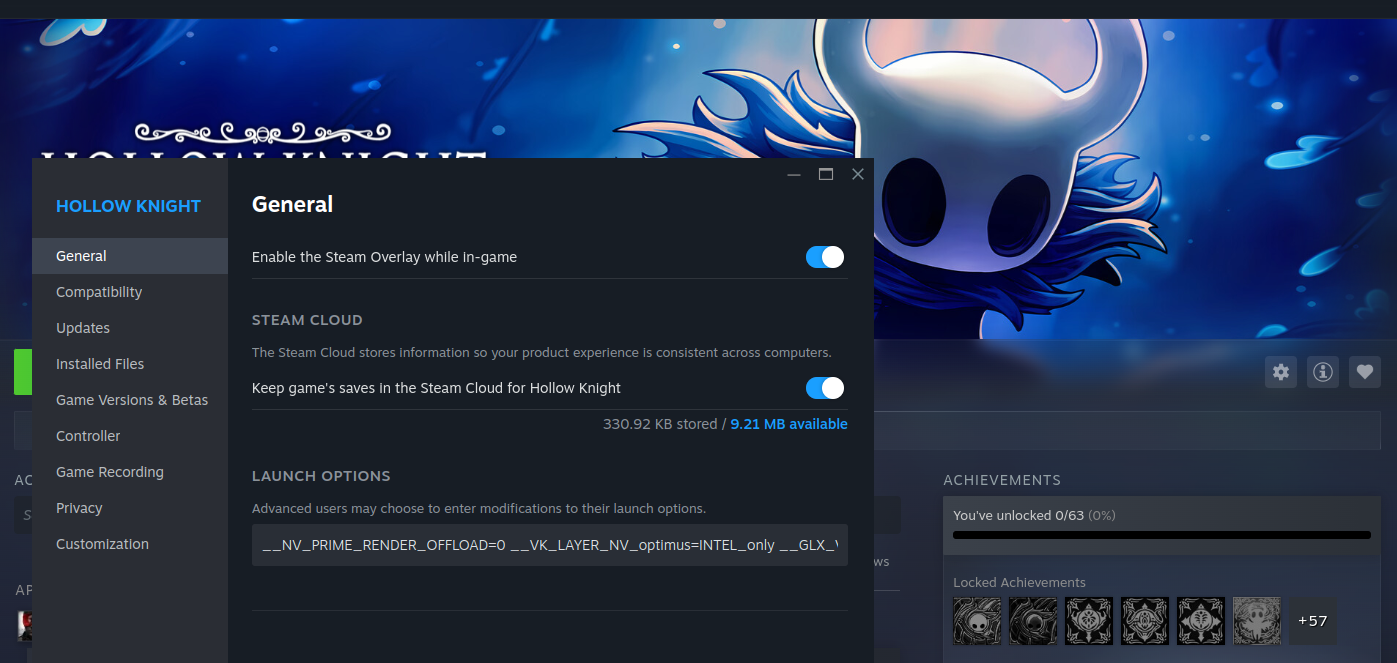
__VK_LAYER_NV_optimus=non_NVIDIA_only __GLX_VENDOR_LIBRARY_NAME=intel %command%
Useful for lighter games where you want to save battery. Note: the correct value is non_NVIDIA_only, not INTEL_only - the latter is not an officially supported value but it works also ;-)
Default (system choice)
Just %command% without any extra variables — Steam will use whatever the system has configured as default.
How to set it in Steam
Right-click a game → Properties → General → Launch Options field. Paste in whichever line you need.
What I learned
Trial and error without internet is actually pretty useful. You’re forced to think systematically instead of immediately reaching for a search engine. The variables are well documented in the NVIDIA PRIME documentation and on the ArchWiki - though I only found that out afterwards.
One more thing: for Vulkan-only games, __NV_PRIME_RENDER_OFFLOAD=1 on its own is enough - no need for the GLX variable.